 Captionshaper
How to add TikTok-style captions to a video
TikTok-style captions are big, bold words in the middle of the screen, a few at a time, with the word being spoken highlighted. In Captionshaper, open your video, pick the Bold or Highlight style, and export the video with the captions burned in. Each word is timed to the voice, so the highlight lands as it is said.
Updated 11 November 2026 · Hollowbit
Step by step
- Open your video in CaptionshaperDrop a vertical (9:16) video on the window. Captionshaper writes the captions on your computer.
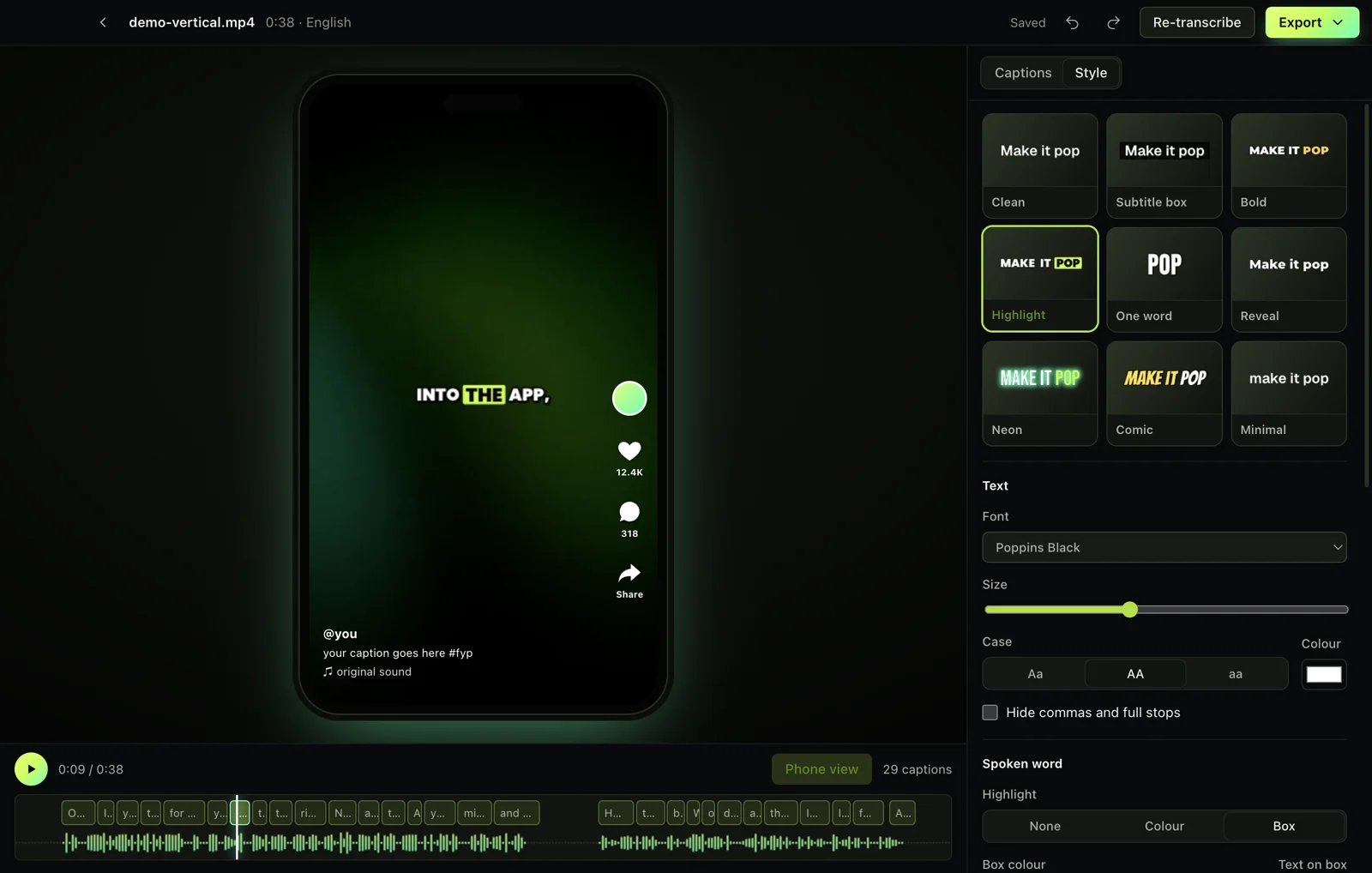
- Open the Style tabPick Bold (yellow highlight), Highlight (word on a box), One word, or Reveal (words appear as they are said).
- Check the phone viewThe preview shows where TikTok puts its like and share buttons, so you can see the captions stay clear of them.
- Tweak the lookChange the font, size, colours, outline and animation. What you see is exactly what gets exported.
- Export the videoChoose "Video with captions" and post the MP4.
What makes captions look like TikTok's
Three things: a heavy font (Montserrat Black, Poppins Black or Anton), only two to four words on screen, and the current word changing colour or popping. A thick outline or shadow keeps them readable on any background.
Keep clear of the buttons
TikTok, Reels and Shorts cover the right side with buttons and the bottom with the caption and username. Captionshaper keeps vertical captions inside a safe zone automatically.
Other ways to do it
CapCut has auto captions but uploads your video and keeps some styles behind Pro. TikTok's own captions can't be styled. Submagic and similar sites charge a subscription.
Questions
Can I change the highlight colour?
Yes, any colour, and you can switch between a coloured word and a word on a box.
Will the captions have a watermark?
No. Captionshaper never adds a watermark.
Does it work for Instagram Reels and YouTube Shorts?
Yes. They use the same 9:16 format and similar safe zones.
More guides
- How to add subtitles to a video automaticallyTurn speech into accurate, word-timed subtitles and add them to any video for free. No upload, no watermark, works on Mac and Windows.
- How to make an SRT file from a videoCreate an accurate SRT file from any video or audio, with every caption timed to the speech. Free and offline on Mac and Windows.
- How to transcribe a video to textGet a full text transcript of any video or audio, with punctuation and paragraphs, without uploading it. Free on Mac and Windows.